BUILT FOR THE NEXT DECISION
Know your next track
before the room waits.
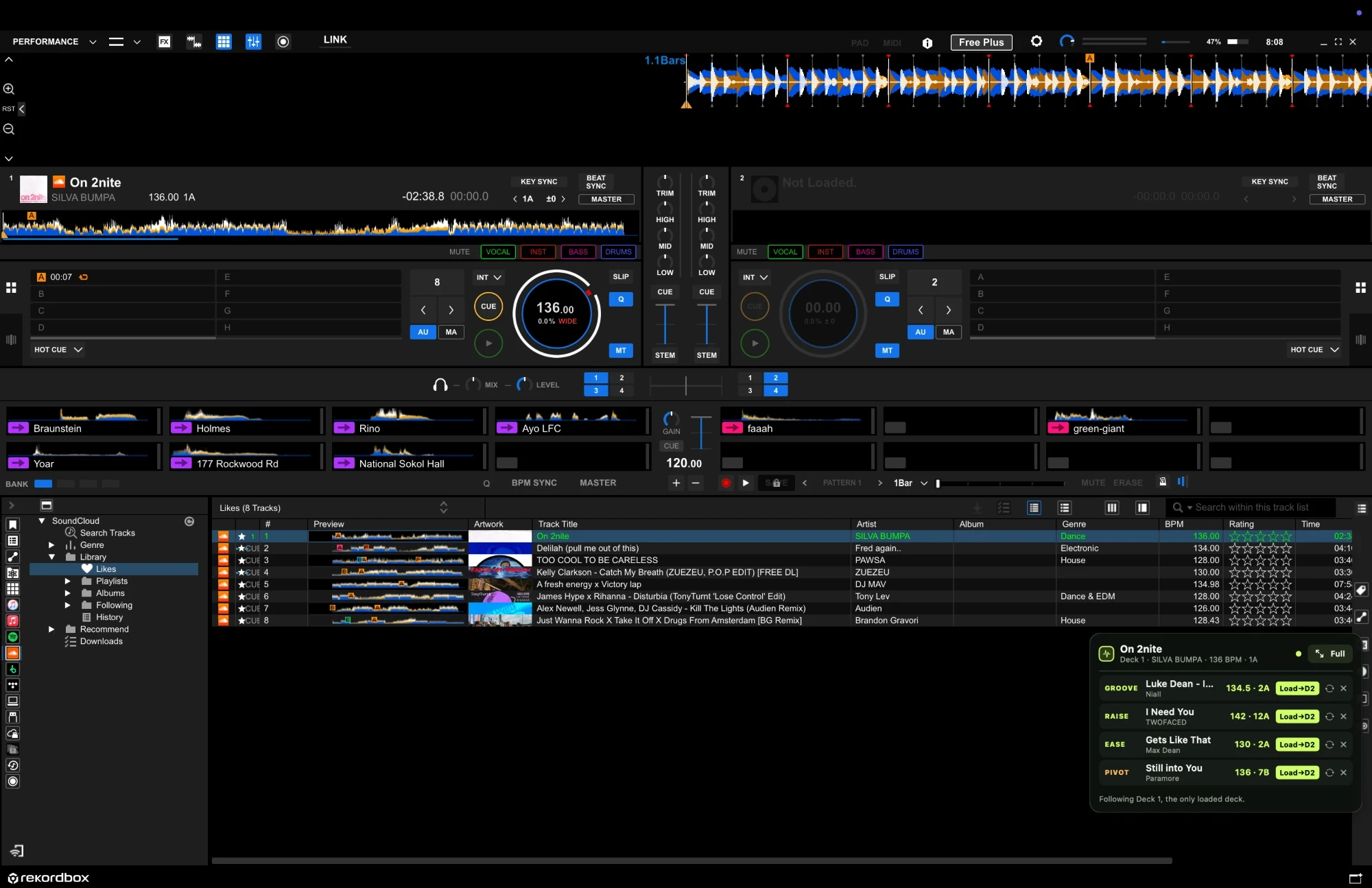
OnCue Live watches the track you load in rekordbox and gives you four next moves from the library you already know: hold the groove, raise the energy, ease off, or pivot to a new key.
Mac app · rekordbox library required · Private beta is for DJs willing to send feedback.
PLAYING
On 2nite
- GROOVELuke Dean · Niall134.5 · 2A
- RAISEI Need You · TWOFACED142 · 12A
- EASEGets Like That · Max Dean130 · 2A
- PIVOTStill into You · Paramore136 · 7B
THE LIVE LOOP
No autopilot.
Just a faster decision.
- 01
Load the track you chose.
Keep DJing in rekordbox as usual. OnCue follows the last dependable track load, so it stays out of the mixer and out of your way.
- 02
Glance at four next moves.
Groove holds the floor. Raise lifts it. Ease lets the room breathe. Pivot moves the key two or more Camelot steps for a deliberate change of direction. BPM and key stay visible beside every choice.
- 03
Make the call yourself.
You choose and load the next record. OnCue learns from the choices and skips that happen during your session, while your library stays on your Mac.
IN THE BOOTH
Sits beside rekordbox.
Stays out of the way.
A real session: rekordbox is playing On 2nite on Deck 1, and OnCue’s compact panel in the corner already has four next moves lined up. Every suggestion comes from the DJ’s own library.
PRIVATE BETA
Help shape the first live version.
OnCue is currently being tested with a small group of DJs. Invited DJs receive a free beta code for up to two Macs and send honest feedback after real sessions.
HOW BETA ACCESS WORKS
- 01Receive a private OnCue beta code.
- 02Install the Mac app and activate it on your own computer.
- 03Export and import your own rekordbox XML library.
No payment details. Your exported library stays on your Mac.
ALREADY INVITED?
Activate your beta app.
Enter the private beta code you received in the OnCue Live app. It activates on up to two Macs and keeps a recent activation available when you are offline at a gig.
Open OnCue Live
Choose Activate OnCue, then paste your code.
ONCUE-XXXX-XXXX-XXXXBETA QUESTIONS
Before you try it.
Does OnCue control rekordbox for me?
Only if you ask it to. By default you choose and load each track in rekordbox yourself. An experimental one-click load, the Load→D2 button in the screenshot, can load a suggestion onto the other deck, the one OnCue isn’t following. It is off until you turn it on, it won’t load over a deck the crowd can hear, and it never touches the mixer.
Does it upload my music library?
No. OnCue reads the rekordbox XML library you choose on your Mac. The live recommendation data stays on that Mac.
Is the beta paid?
No. Private beta access is free while OnCue is being tested in independent DJ sessions.